Odoo
Chatter Feed
Here's a question that will make every Odoo power user wince: how many clicks does it take to piece together the full story on a deal?
You're managing a sales opportunity. There's a conversation thread in CRM. There are internal notes on the sales order. The project team logged a status update on a task. Purchasing left a comment on the vendor bill. And somewhere in there, your CEO asked a question three weeks ago that nobody can find.
So you click. CRM → open the lead → scroll to chatter. Nothing useful. Sales → open the order → scroll to chatter. Partial answer. Project → open the task → scroll through 47 messages from last month. Maybe it's here. Maybe it's not. Maybe you'll spend the next 20 minutes on a scavenger hunt across four modules before you give up and Slack someone who was on vacation when it happened.
This isn't a minor inconvenience. It's a systemic productivity drain hiding in plain sight. According to Forrester, knowledge workers lose approximately 12 hours every week searching for information scattered across disconnected systems. Multiply that across your team, and you're burning thousands of dollars monthly on a problem that shouldn't exist in an integrated ERP.
We built something that eliminates this problem entirely. It's a unified feed that aggregates every chatter message, email, note, SMS, and meeting from CRM, Sales, and Projects into a single, searchable, filterable interface — with an AI assistant that can answer questions about all of it instantly.
No tab switching. No scroll marathons. No guessing which record holds the answer.
The Hidden Tax of Fragmented Chatter
Odoo's chatter system is genuinely powerful. It tracks every communication, every field change, every note, every scheduled activity — right there on the record. For individual records, it's brilliant.
The problem shows up the moment your workflow spans more than one module.
Consider what happens in a typical B2B sales cycle. A lead comes in through CRM. Your sales rep qualifies it, logs notes, exchanges emails with the prospect. The lead converts to an opportunity. More notes. A quotation is created — now there's a separate chatter thread on the sales order. The customer asks for a custom deliverable, so a project gets created. The project manager logs updates on tasks. The finance team adds notes when the invoice is sent.
By the time this deal closes, the full conversation history is scattered across five to eight different records in three or four modules. There is no single place in standard Odoo where you can see all of it at once.
This isn't a theoretical pain point. The Odoo community forums are filled with users requesting exactly this capability. One highly-upvoted forum post puts it plainly: teams want a unified, searchable view of all chatter notes and messages linked to a customer across different models — leads, sales orders, contacts, invoices — all in one place.
Standard Odoo doesn't offer this. And the existing third-party ecosystem doesn't solve it either.
Why Existing Solutions Fall Short
If you've searched the Odoo Apps Store or browsed community modules looking for a unified feed, you've probably encountered three categories of "solutions" — none of which actually solve the problem.
Notification Modules
These modules push chatter alerts to your inbox or trigger browser notifications when new messages arrive. Tools like "Push Notification From ChatBox" or Odoo's built-in notification system are designed for awareness, not context. You find out something happened, but you still need to navigate to the record to understand it. For teams managing 30+ active deals, this means more interruptions without more clarity.
The Discuss App Inbox
Odoo's native Discuss app collects notifications in a central inbox, which sounds close to what we're describing. But there's a fundamental limitation: it only shows messages where you're a follower or were explicitly tagged. It doesn't aggregate all conversations across related records for a given customer or deal. Miss a follow notification? The message vanishes into the "History" tab, and you'd never know it existed.
Custom Dashboard Workarounds
Some partners build custom views or reporting dashboards that pull mail.message records into a list. This gets technically closer, but the execution is usually a flat table of messages without context — no visual distinction between emails and notes, no entity-level filtering, no way to jump to the source record, and certainly no search across message bodies.
What's missing across every available option is simple: a purpose-built feed that shows all related communications in one place, lets you filter and search across them, and gives you direct access to the originating record.
That's the gap we filled.
What the Unified Feed Actually Does
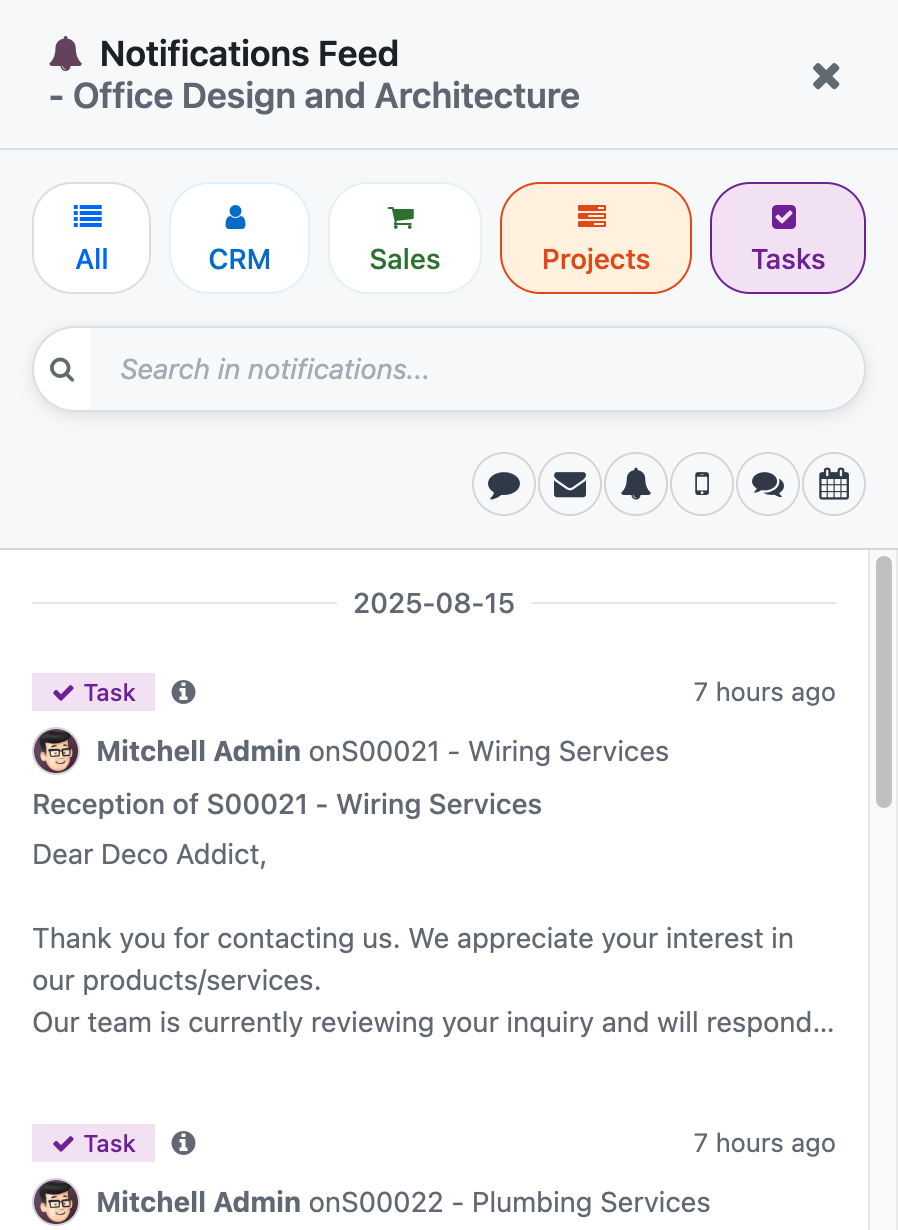
The CRM + Sales + Project Feed is a Smart Button that appears inside your CRM, Sales, and Project modules. Wherever you are in the sales-to-delivery workflow, the feed is one click away — and it shows everything.
Complete Message Aggregation
The feed pulls together every type of chatter entry from all related records:
- Emails sent to and received from customers
- Internal notes logged by your team
- Notifications from system events
- SMS messages and WhatsApp communications
- Meeting logs and activity summaries
- Field change tracking (formatted exactly like native chatter, so stage changes, assignment updates, and field edits are immediately recognizable)
All of this appears in a single, chronological timeline. If a sales rep logged a note on the CRM lead, the project manager commented on a task, and the customer replied to an invoice email — all three appear in the same feed, in order, with clear labels showing which record each message belongs to.
Smart Filtering
Not every message matters at every moment. The feed includes two layers of filtering that let you zero in fast:
Entity Filtering — Toggle visibility by module. Want to see only CRM-related conversations? One click. Need to focus on project task updates? One click. Looking at the full picture across CRM, Sales, and Projects? Show all. This is especially powerful during handoffs between departments, where a project manager might want to catch up on the sales conversations that shaped the scope before delivery began.
Message Type Filtering — Filter by the kind of communication: emails only, internal notes only, system notifications only, or any combination. This is the feature that saves time during audits and escalations. When your VP of Sales asks "what exactly did we tell the client about pricing?", you can filter to emails only and have the answer in seconds instead of minutes.
Full-Text Search
The feed supports search across message subject lines, body content, author names, and preview text. This sounds basic until you realize that Odoo's native chatter search only works within a single record. If you're looking for a specific conversation and you're not sure whether it happened on the CRM lead, the sales order, or a project task — in standard Odoo, you're running three separate searches.
With the unified feed, you run one search and find it instantly, regardless of which record it lives on.
One-Click Navigation
Every message in the feed includes a direct link to the originating record. Found the message you were looking for? Click it, and the record opens in a new tab. You can read the full context, take action, and return to the feed without losing your place.
This is a small detail that makes a big operational difference. It turns the feed from a read-only dashboard into an action-oriented command center. You're not just reviewing information — you're using it to make decisions and execute, right now.
Permission-Aware
The feed respects Odoo's native access control. Users only see messages from records they have permission to view. If a team member doesn't have access to the Project module, project-related messages won't appear in their feed. This isn't a bolt-on security layer — it's built directly into the query logic, so there's zero risk of information leakage.
The AI Layer: Ask Questions, Get Answers
Here's where it gets genuinely interesting — and where we haven't seen anything else in the Odoo ecosystem doing what we've built.
The feed includes an AI-powered assistant that can read the entire aggregated conversation history and answer questions about it in natural language.
Think about what this means in practice.
Instead of scrolling through 200 messages across six records to find out what happened with a client's custom request, you type: "What did the client say about the delivery timeline for the Phase 2 rollout?" — and get a direct answer, synthesized from the relevant messages, in seconds.
Instead of asking three colleagues to piece together the history of a pricing negotiation, you type: "Summarize all pricing discussions with this customer over the last 90 days." — and get a coherent summary pulled from CRM notes, sales order emails, and project task comments.
This isn't a generic chatbot. It's operating on your actual conversation data — the specific messages, notes, and emails tied to the records you're looking at. The AI doesn't hallucinate context from training data. It reads what your team actually wrote and communicated, and it answers based on that.
Where the AI Saves Serious Time
Account handoffs. A new account manager is taking over a client relationship. Instead of scheduling three hours of knowledge transfer meetings, they open the feed, ask the AI for a summary of the last six months of interactions, and they're caught up in five minutes.
Escalation prep. A deal is stuck, and your VP wants a briefing before stepping in. The AI can summarize the negotiation history, highlight outstanding concerns the client has raised, and identify which team members were involved in key decisions — all from one prompt.
Audit and compliance. Need to verify what was communicated to a customer about contract terms? The AI can search across all message types and surface the exact conversations where terms were discussed, with timestamps and authors.
Executive reporting. Rather than asking project managers to write status updates, leadership can query the feed directly: "What are the current blockers on Project X?" — and get an answer derived from the actual task-level communications.
The Real-World Impact: From Clicks to Clarity
The numbers around fragmented information are staggering, and they scale in ways most teams don't appreciate until they see the math.
Industry research consistently shows that data silos represent one of the most expensive hidden costs in business operations. The productivity impact alone — employees spending significant portions of their week hunting for scattered information — compounds into thousands of lost hours annually for even modest-sized teams. Organizations report that poor data accessibility can extend sales cycles, delay project delivery, and create costly errors during handoffs.
For a 15-person team spanning sales, project management, and operations, even a conservative estimate of time saved — say 30 minutes per person per day in reduced context-switching and information hunting — translates to over 150 hours per month returned to productive work. That's nearly a full-time equivalent.
But the harder-to-quantify benefit might be even more valuable: decision speed. When the full picture is available in one place, decisions happen faster. Deals move through the pipeline with less friction. Project issues get escalated before they become crises. Customer questions get answered in minutes, not days.
Who This Is Built For
This feed delivers the most value for organizations where the sales-to-delivery pipeline involves multiple Odoo modules and multiple team members:
- Sales-driven organizations running 20+ concurrent opportunities where sales and delivery teams need shared visibility into customer communications.
- Professional services firms where projects originate from CRM opportunities, and the handoff between sales and delivery requires complete context transfer.
- Operations-heavy businesses where purchasing, project management, and customer communication all feed into the same deal lifecycle.
- Growing teams where institutional knowledge is concentrated in a few people's heads — and the risk of losing context during turnover is real.
- Leadership and management who need visibility into what's happening across deals and projects without asking for status updates.
If your team uses Odoo CRM, Sales, and/or Projects — and you've ever lost time hunting for a conversation that you know happened somewhere in the system — this was built for exactly that problem.
Key Takeaways
The core problem: Odoo's chatter is powerful per-record, but fragments conversation history across modules. Teams spend significant time daily navigating between CRM, Sales, and Project records to piece together the full story on a deal or customer.
What the feed does: Aggregates all chatter messages, emails, notes, SMS, and tracked changes from CRM, Sales, and Projects into a single, filterable, searchable timeline — accessible via a Smart Button in any of those modules.
The AI advantage: A built-in AI assistant reads your aggregated conversation data and answers natural-language questions — enabling instant summaries, faster handoffs, and on-demand context that would otherwise require hours of manual searching.
Operational impact: Reduces context-switching overhead, accelerates decision-making, eliminates information silos between departments, and returns hours of productive time to your team every week.
Security: Fully permission-aware. Users only see messages from records they have access to.
Get Started
Getting the unified feed installed and running takes minutes, not days.
Step 1: Contact us directly. Let us know you want the CRM + Sales + Project Feed module.
Step 2: We'll walk you through installation and configuration. The module integrates with your existing CRM, Sales, and Project setup — no restructuring required.
Step 3: Your team gets a single pane of glass into every conversation that matters. And with the AI assistant, they'll never have to scroll through 200 messages to find an answer again.
If your team runs Odoo and you've ever wished you could see everything about a deal in one place — this is that solution.